
On this page
ROB RUN best settings and PC requirements
Settings that raise FPS without hiding players, the official mouse-lag fix, and the real system requirements.
If your FPS collapses when you move the mouse, lower your mouse polling rate. Kefir's own support FAQ names this as the cause. For more FPS, turn off Shadows, Additional Light, HBAO, Reflections, Motion Blur and Depth of Field. Keep Object Visibility Distance high so you can still see other players. We found no DLSS, FSR or XeSS in the guides we checked or on the Steam page. The only scaling option they document is Render Resolution.
Checked against Kefir’s public notes for the 17 Nov 2026 patch.[1]
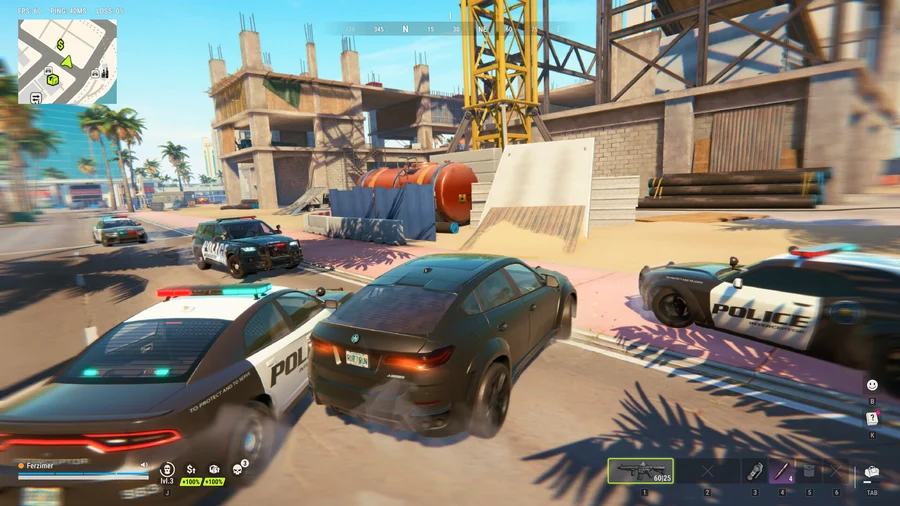

ROB RUN PC requirements
| Part | Minimum | Recommended |
|---|---|---|
| OS | Windows 10+ (64-bit) | Windows 10+ (64-bit)[2] |
| CPU | Intel Core i5-6600K / AMD Ryzen 5 1600 | Intel Core i5-9600K / AMD Ryzen 5 3600[2] |
| RAM | 12 GB | 16 GB[2] |
| GPU | GTX 1050 Ti / RX 580 / Intel Arc A380 | RTX 2070 / RX 5700 XT / Intel Arc B570[2] |
| DirectX | 11 | 11[2] |
| Storage | 20 GB | 20 GB[2] |
From the Steam store page, checked 18 November 2026. You need a broadband connection, and the game uses kernel-level anti-cheat.
Best ROB RUN graphics settings for FPS
| Setting | Recommended | Why |
|---|---|---|
| Display Mode | Fullscreen | Steadier frame pacing |
| VSync | Off | Lower input lag |
| Frame Rate Limit | Your monitor's refresh rate | Stops the GPU running flat out on menus |
| Render Resolution | 1.0, or 0.8 if you need FPS | The only scaling option the guides document. Lower it before you drop other settings to Minimum.[3] [4] |
| Shadows / Additional Light / Additional Light Shadows | Off | The biggest FPS cost in crowded areas |
| HBAO / Environment Reflections | Off | Costly, with little gameplay value |
| Motion Blur / Depth of Field | Off | Clearer image while you move |
| Level of Detail / LOD Crossfade | Lower than default / Off | Less pop-in work |
| Water / Grass / Grass Draw Distance | Low | Grass can hide players at long range anyway |
| Object Visibility Distance | High / Max | Keep this one high: it decides how far away you can see other players |
| Texture Quality | Match your VRAM | Has little effect on FPS if you have enough VRAM |
Setting names come from the KeenGamer (15 Nov), GamerBlurb (7 Nov) and hone.gg (9 Nov) guides. The three guides mostly agree on what to turn off, but their exact values differ, so we give a direction rather than one number where they disagree. KeenGamer adds that the Minimum preset is not recommended. If you change any single option, the preset switches to Custom.[4] [3] [5]
Fix FPS drops when moving the mouse
Kefir's official support FAQ says FPS dropping to single digits when you move the mouse is caused by "an excessively high mouse polling rate". Its fixes, in order:[6]
- Lower the polling rate in your mouse's own software.
- Update your GPU drivers and BIOS, "especially if you're running a 13th or 14th Gen Intel processor".[6]
- Turn off the Discord and GeForce Experience overlays.
Does ROB RUN support DLSS or FSR?
Not as far as anyone has documented. As of 18 November 2026, the Steam page doesn't mention DLSS, FSR or XeSS, and neither do any of the settings guides we checked. The only scaling control they document is Render Resolution. We will update this section if Kefir adds an upscaler.[2] [4] [3] [5]
ROB RUN HUD, audio and control options
- FPS, Ping and Packet Loss display: shows whether lag is your PC or the server.
- Sound Effect Visualizer: shows on screen where sounds come from.
- Streamer Mode: hides information you don't want on stream.
- Invert mouse Y: added in the 17 November 2026 patch.[1]
Stutter, crashes and lag that settings won't fix
- Stuck on "Compiling shaders": restart Steam, verify game files and clear the DirectX shader cache.
- Lag in crowded areas: often server-side. Kefir's 17 November patch lists "improved connection stability". Check server status before you change settings.[1]
- Login problems: on 14 November 2026 the EU servers had login problems and Kefir restarted them. Watch the Steam news page or the official Discord.[7]
Sources: Steam store page; Kefir support FAQ; settings guides from KeenGamer, GamerBlurb and hone.gg, used where they agree. Checked 18 November 2026.
Frequently asked questions
Why does my FPS drop when I move the mouse in ROB RUN?
Kefir's support FAQ says the cause is an excessively high mouse polling rate. Lower it in your mouse software, update GPU drivers and BIOS, and turn off overlays.
[6]Does ROB RUN have DLSS or FSR?
No upscaler is documented as of 18 November 2026. The only scaling option the guides we checked document is Render Resolution.
[2] [3] [4] [5]How much RAM does ROB RUN need?
The official minimum is 12 GB RAM, with a GTX 1050 Ti or RX 580. Recommended is 16 GB RAM and an RTX 2070 or RX 5700 XT.
[2]Sources
- Kefir · Patch Notes 17 Nov 2026
- Kefir on Steam · ROB RUN store listing Early Access release · 4 Nov 2026
- GamerBlurb · Best settings 7 Nov 2026
- KeenGamer · Best settings for FPS 15 Nov 2026
- Hone · PC settings 9 Nov 2026
- Kefir Support · FPS drops when moving the mouse Game patch · 17 Nov 2026
- Kefir · Technical Issues on EU Servers 14 Nov 2026
Play more
Free browser games you can play instantly — sledding, trucking, puzzles and 2 player games. No download.
Play free games